I don’t watch much television, so I didn’t see the new Apple ads until I was sent this web link. “Restarting” and “Network” are recommended for a chuckle.
Can’t do that with a nano
Most frivolous use of 200 iPods, ever.
About the Cult of Macintosh
You can rapidly judge whether an argument is emotional or rational by the amount of backstory that’s necessary to justify it.
This argument will require a lot of backstory.
I’m replying to Brian’s Being All That Apple Can Be essay here, and I can already tell that I’ll spend as much time talking about the “Apple community” and my experience working with Apples (dating back to 1981 or so) as I am going to discuss these nifty new machines that can boot Windows. In fact, in this essay, the Mac community is all I have room to discuss.
We’re Not Zealots, We’re Fanatics
The first thing I’d like to address is the term “zealot”. Yes, Apple users are, well, emotionally involved with their computers. Actually, all computer users are emotionally involved with their computers, and if you don’t think so, then you’ve never seen an undergraduate have a breakdown in a computer lab when his senior thesis got eaten by a power surge.
We’re all human (most of us, anyway), and we anthropomorphize the technologies we rely on. We name our cars. We customize our cell phones. And we chant reassuring incantations to our computers to encourage them to do what we want.
What differentiates Apple users from the superset of all computer users is that we attach our pet concepts to the brand name. I doubt that there’s any computer user on the planet who hasn’t verbally attacked his computer—brand name notwithstanding—when it foiled his plans for the day. But what Apple users have noticed is that we seem to say nice things to our computers more often than the rest of you.
Perhaps that’s no longer true. Perhaps there are thousands of Windows XP users out there who have named their laptop “Strawberry” and who sing metaphorical lullabies to it when it goes to sleep. All I can say is that I haven’t met those people, but I meet their Apple counterparts on a daily basis.
The vast majority of my interaction with “average” computer users is at Starbucks and other public Wifi points. All I can report on is this anecdotal experience. There was once a time when I would frequently be the only Apple user in the store. Today that ratio is closer to 50% or greater. Apple users talk to each other; the glowing bat-signal on the case is a beacon that invites conversation. I’ve seen this rarely with Palm users; never with Windows laptops.
The distinction between zealots and fanatics is that zealots are engaged in religious battles. Fanatics have reasons, however tenuous, for their devotion. The Apple community does have its zealots, no question; arguably, this dynamic was created when the zealots of the 1980s believed that any computer with a graphic interface was a “toy”. But most of us do stick with Apple for sound reasons, and most of us do note when Apple makes a misstep.
Our Relation to the Mothership
There’s no doubt that most computer companies do not have users sticking decals on their cars. Few non-Mac users ever cared about the loss of graphic doodads on their computers like we noted the discontinuation of the rainbow Apple and the happy Mac.
But we also remember, and not with fondness, John Scully and Gil Amelio. We remember the proliferation of beige boxes with incomprehensible numbers and completely different architectures. We remember the twelve different versions of System 7.
Which is why we treat Steve Jobs like a demigod: not because he is the head of Apple, but because he remade Apple into the company we wanted it to be.
And what do we want it to be? Brian accuses us as follows:
Among the most brand-loyal consumers on the planet, the Zealots believe that Apple is a different kind of company. Nicer. Purer. Out for something more than generating profit for its shareholders. Out to make the world a better place. The only company on the planet that would willingly forego something profitable for something “cool.” The Luke Skywalker to Microsoft’s Darth Vader. The Ben & Jerry’s of personal computing.
This is almost entirely accurate. Apple isn’t alone in this, either; Ben & Jerry’s does quite nicely on its own corporate benevolence policies, and there are even organizations that promote the idea that turning a profit should not be the be-all and end-all of a corporation, as heretical as that might seem in the halls of Wharton.
Where it is inaccurate is the belief that we don’t care whether Apple turns a profit. You can’t go out today and buy a Timex/Sinclair, or an Amiga, or a SpectraVideo, despite the fact that each of these computers had some rather nifty features. If Apple collapses as a company, then the day comes when we can’t go out and buy a Macintosh. I am seriously invested in using Macintoshes; this is something I care about.
But let’s explore the idea of “cool” for a moment. No, Apple didn’t invent the GUI, but Apple did popularize it. Apple did set the standard for twenty years (and counting) of what a computer should do. Apple also introduced trackballs and palm rests into their laptops. Apple arguably set the stage for Palm devices. Apple was the first to popularize Wifi computing, and the first to build Bluetooth into an entire line of laptops.
Are these merely cool features? Hardly. These are affordances; design choices that allow the average person to do things with technology that were previously impossible. These things did not happen because they were guaranteed to be profitable; they happened because the designers at Apple do think that they are working towards some goal that is higher than the pursuit of profit.
I don’t know what the accountants in 1993 had to say about the profitability of the palm rest design. What I can say, with little fear of contradiction, is that having worked with Apple laptops for 13 years, 10-12 hours per day, seven days a week, I probably owe my lack of a crippling RSI injury to some anonymous industrial designer working at Apple when I was an undergraduate. Now that these are the industry standard, so does nearly every other laptop user.
As Brian points out, Apple enjoys a level of rockstar coverage in the tech world and mainstream press that is far out of proportion to its market share. Is that because the news media has been brainwashed by the Jobs Reality Distortion Field, like we are? Or because it’s generally recognized that when you go to an Apple announcement, you are likely going to see something that makes news, even for non-Apple users?
This is why we give allegiance to Apple. Making the world a better place should not be an accusation.
Safety in (Low) Numbers
Which brings us to the perennial market share argument. A few years ago, I found myself quoted extensively on the Internet with the line, “Yes, it’s true: Windows has 50,000 applications you will never use, while the Macintosh has only 10,000 applications you will never use.” From the user perspective, the market share argument has much the same dimensions.
No question, there are more Windows users out there than Mac users, by some vast number. There are constant arguments about what percentage of people use Macs, since market sales overlook the fact that Macs have longer lifespans than Windows machines.
I’ll leave that aside for now; pick your pundit and run with his numbers. I’ll just return to Starbucks. In Washington DC, New York, and Philadelphia, at Wifi hotspots, the number of Apples has been steadily growing for years. It’s not uncommon to only see Apples in such places. Maybe all the Windows users have desktops. Maybe Windows has complete market domination of the red states. Maybe the Mac users like their laptops more and bring them with them to coffeeshops in greater numbers. Doesn’t much matter; the community is visibly growing and has been for some time.
There are two viewpoints a current Mac user could bring to this phenomenon:
1) They might like being part of a small, special clique, a member of the “rest of us”, and view with some suspicion any move by Apple that will grow the market share quickly.
2) They might just like using Apples and talking to other people who use Apples, and the more, the merrier.
Of course, I’m firmly in the second camp. I make my living selling clever ideas to people who use Macs, and every new Mac user is part of Jeff’s expanded target market. However, all of us in camp 2 share some concerns with camp 1:
1) If Apple expands their market by creating radically different computers (i.e., computers that suck), then since we have to buy those computers eventually, we fear that someday our computers won’t be as enjoyable to use.
2) A flood of new people means people who don’t enculturate into the existing community as smoothly. Cf. the “Christmas modemers” of the late 1980s who changed the nature of many BBS systems, or the AOL onslaught that caused the “death of USENET”. Mac users are self-selected, and so part of why we have a community is because we might share some things in common. Expand that community rapidly, and the commonality fades.
I personally don’t think either is likely; Apple’s next computers are different, but they don’t suck and I don’t expect that to change. And I’ll worry about the community changes that come with larger market share when it happens; that would alter the community, but there will be concomitant benefits.
In my next essay, I’ll cover technical details that Brian brings up, and get into more detail about shipping hardware.
Spending my summer in Boot Camp
Only Nixon could go to China, and only Jobs could give away a means of booting Windows on shipping Macs.
Amidst the vast quantity of misinformed speculation about Apple that has circulated in the last week, two things have reliably occurred:
1) Apple is getting front-page headlines.
2) Pundits are jumping up and down to declare the death or radical transformation of Apple as a company Mac OS.
Suffice to say, as a guy who makes his living using Mac OS, yes, I do have a game plan to learn more about Windows in the next eight months, but not because I’m going to be switching business models. It’s because I think I’m going to have to extend my business model.
Future Directions for Mac OS X
The first point worth addressing is the theory that this will be the death of Mac OS X because developers will only write for Windows and tell Mac users to use the Windows versions of their software. As one website replied, developers could also tell users to hit themselves in the head with hammers.
The existing Mac developer (and consulting) community has two good reasons to support Mac users: it’s profitable, and it’s enjoyable. I suspect that I have the mental chops to become a Windows consultant, but I just don’t like working with Windows the way I enjoy working with Macs. The professional support community won’t voluntarily stop working with Macs due to this quality-of-life issue, and they won’t be forced to make that switch unless working on Macs ceases to be profitable.
(This might be a good time to resurrect a hoary chestnut I’ve been telling for ten years. I did have to stop solely being a Mac consultant a decade ago in favor of being a Mac/Internet/database consultant. My independent Windows colleagues did very well for themselves with a roster of a dozen clients or so; my own similarly-sized roster of Mac clients didn’t pay nearly as well, because Mac clients simply didn’t need professional support as often. I think of this every time I see the phrase “total cost of ownership”.)
The death knell argument goes something like this, to quote an Engadget podcast I listened to recently: Rhapsody, the online music service, is Windows-only. Given that Mac users can “just boot into Windows” to listen to Rhapsody, the service has zero incentive to write a Mac version.
Excepting, of course, that booting into Windows requires shutting down all of the other applications you might be running. You have to really like Rhapsody in order to do that. It’s a viable strategy for mission-critical software, but it’s simply not going to fly for anything of lesser importance. Mac-based businesses that have software like that already have their one PC sitting over in the corner of the office, next to the last typewriter that they use for envelopes; Boot Camp just means that that computer won’t be replaced in the next upgrade cycle.
The ecosystem supporting both Apple and people who make their living on Apple hardware is going to continue apace. What’s changed is that the membrane separating us from the rest of you just became more semi-permeable. That is a fairly major change, but not one that’s going to adversely affect the health of our community. In fact, the more likely outcome is that this will completely change the landscape of the computing industry by 2008.
Windows for the Rest of Us
This is what a multiplatform environment looks like on a Macintosh, as of two weeks ago:

Here you’ve got the three major operating system environments, side by side. iTunes is the native Mac software in the upper-left. Windows runs in emulation in its own window (actually, in emulated emulation; that’s a screenshot rather than Virtual PC). In the upper right, I have pan running under X11 using GNOME, which in turn uses the Aqua window manager to make those windows mostly interoperable with other Mac software. You can see the Mac Growl notification popping up in the upper right on top of the X11 window to tell me the newest song playing in iTunes.
If I wanted to, I could bring up a fourth environment, Mac OS Classic, where I could run OS 9 and earlier software, also in their own floating windows much like pan.
There are two interesting things to note about this setup:
1) X11, like Windows, normally ships in its own environment with OS widgets like desktops, file navigation, etc. If you like, you do have the option of turning this back on with Apple’s X11 implementation, and then switch back and forth (without rebooting) between both environments. But as with Classic, Apple shipped the much more useful system of allowing these windows to live side-by-side.
2) In fact, Apple has never shipped concurrent OS software for OS X that forced you to switch into multiple environments. The beta of X11 for Jaguar did require this, but the shipping version with Panther had the option.
Boot Camp, lest we forget, is in beta.
I’ll hasten to add that I have absolutely no idea what would be required to free Windows windows from the tyranny of an enclosing desktop. It might very well be impossible, or at the very least require too much horsepower to be usable. But we’re talking about the people who shipped a version of Unix that your grandmother can use. When it comes to Apple, I tend to redefine my outer limits of what’s possible.
This extends John Gruber’s idea that Macs are no longer different, they’re special. That is, buy an Intel Mac, and you can do anything you could do with a Dell or a Sony. And then some. Side-by-side windowing takes this further. Copy a picture out of iPhoto and paste it into Act!. iSync your Outlook calendar to iCal and publish it to .Mac.
If I really wanted to push this idea, I’d suggest the possibility of using Automator (an AppleScript utility that lets you write programs without knowing a single line of code) and Apple GUI Scripting (a framework that allows AppleScript to work with applications that don’t have their own AppleScript hooks) to give Windows users the ability to automate their software right out of the box, in ways that are impossible on a native Windows-only machine.
(Some of you may have noted that my side-by-side environment contradicts the argument I made earlier about Rhapsody. If this is how it plays out, I still think that Mac software will be written and developed, but it will have to continue to be better than the Windows equivalent. I expect that even in the most highly integrated environment, there will be programming hooks that allow you to do more in Mac native software than with Windows.)
Regardless of what Apple does here, there is one thing that I think is self-evident: Apple is going to do what it can to make Windows on a Mac better than Windows elsewhere. Windows on your MacBook Pro—a branding change that perhaps makes more sense now—is going to blow the doors off your Vaio. Somehow.
2007: A Mac Odyssey
Which brings us to the question of what Apple is going to ship with 10.5, and what it’s going to do to the computer industry.
The first one is a no-brainer: Apple is going to ship configurations that are preloaded with Mac OS X and Windows. After all, other companies are doing this already. And we can presume that Apple’s OEM Windows is going to have critical differences from the stock model, so perhaps with the right support options in place (i.e., same-day on-site service at any Apple Store), it might behoove switchers to buy Apple’s dual-OS system rather than just load in their existing copy.
The reverse case is a bit tougher; I’m trying to decide whether we’ll see an Apple-sanctioned method to run Mac OS on non-Apple hardware. This has also been done already, but there’s a big difference between hacking it together and using a version sanctioned by the mothership. Last year I theorized that Apple could do this by selling cheap copies of Tiger after Leopard is released, but Gruber has me rethinking this with his commentary that Apple makes money selling Macs, not software. I’m further rethinking this because by definition, Tiger will be a second-class experience after Leopard is released, and it’s not Apple’s style to pitch that, even as a loss-leader to entice people to buy Macs next time around.
That being said, it would be trivial to design the next version of OS X so that it does things on Mac hardware that it won’t do elsewhere, and to do the same thing with Apple’s OEM Windows release. (All such DRM would be hackable, but only by the elite; I don’t see this as a market barrier to differentiating Mac hardware by making the software more featuriffic.) So I do still see a market to allow Apple to siphon off the most profitable Windows customers (again, using Gruber’s thinking here) by giving them a dirt cheap way to play with Tiger, in the expectation that they’ll shortly thereafter upgrade their home and SOHO machines to get their hands on Leopard and iLife ’08, or whatever the latest-and-greatest turns out to be.
The requirement here is that Apple can’t be seen as selling a substandard solution for non-Mac hardware. If they think that’s the way it will play in the marketplace, they’ll never sanction this. But if their marketing people—who also have been known to pull off a few miracles—can come up with a way to sell this as the “cheap option which is better than what you have,” and the “better hardware option with the best and most flexible environment on the planet,” then that might be your cue to sell your stock in Dell.
Which brings me to my own game plan, as a Mac guru. I think that it’s a given that at some point shortly, my clients will be using dual-boot environments (at the very least), and it’s a safe bet I’ll be running one myself. (I am really looking forward to playing Half-Life 2 on my laptop.) I have very little doubt that there are individual Windows apps I’d like to use regularly in a side-by-side environment, and it’s my job to recommend to my clients the best tool for their needs. So I’ll be designing a crash course to become Windows-fluent between now and the release of Leopard. I anticipate (and I suspect Apple is anticipating the same thing) that time spent in Windows is going to be 10% pleasant interaction with useful software, and 90% wishing that I were back in my home environment.
But it’s what I think will be necessary in order to hit the ground running when Apple releases 10.5, because no matter what it can and cannot do, it’s definitely true that it’ll contain some interesting surprises.
[The Red and the Blue: Brian Greenberg disagrees with me eloquently and vociferously.]
The Portable MacBrick Pro
Peter Green is clearly my kind of guy. Or, at least, he’s the kind of guy who would take a Mac mini and turn it into a laptop.
I spent a few weeks a while back working out what I’d need to do to turn my PowerBook into a wearable Borg attachment. Turns out, it’s not that difficult: monitor glasses, a Bluetooth chordal keyboard and trackpad, and Bluetooth wireless connections to the cellphone for Internet when Wifi isn’t available. The only problem I didn’t get around to gracefully solving: re-engineering my backpack to provide suitable cooling to a snugly encased (and poorly ventilated) PowerBook running at full tilt, but the beta version had that issue solved with (if you will) a hot-swap cold pack.
Mind you, I chickened out on actually building the thing out of fears that I’d fry my laptop. Oh, and fears that no one would speak to me, ever again. But I do have an extra laptop or two lying around….
Subversive programming for Apple
This story is old news, but I suspect some of my regulars haven’t heard it before. The true story of how Graphing Calculator shipped on 20 million Macs, and was used to demo an entire new generation of hardware, despite the small problem that the project was canceled and all the employees had been fired.
You have the option of reading the story or listening to it in RealAudio.
In August 1993, the project was canceled. A year of my work evaporated, my contract ended, and I was unemployed. I was frustrated by all the wasted effort, so I decided to uncancel my small part of the project. I asked my friend Greg Robbins to help me. His contract in another division at Apple had just ended, so he told his manager that he would start reporting to me. She didn’t ask who I was and let him keep his office and badge. In turn, I told people that I was reporting to him. Since that left no managers in the loop, we had no meetings and could be extremely productive.
Another take on Apple’s history
The guys from Crazy Apple Rumors cover 15 billion years of Apple history.
TidBITS coverage of the Great Antischism
I realize that many of you (okay, maybe one of you) have been waiting for me to post some thoughts about the recent Windows-on-Mac developments. And I will, Any Day Now.
But in the meantime, check out some of this TidBITS coverage: an excellent article on BootCamp, a brilliant discussion of virtual machines, and a very interesting earlier article about a Windows guy who switched to Mac and how he tried to keep himself enterprise-friendly.
JeffHack: Getting iCal and TimeLog to coexist peacefully
One of an occasional series of ways I make my Macintosh weep. For Pete’s sake, I don’t recommend that you do this, and if you do it’s at your own risk. This is meant more as a tutorial for ways you can hack your Mac.
The problem: I use Stefan Fuerst’s wonderful TimeLog software to keep track of my billable and other work time. It’s great in many respects, but it had one behavior that really bugged me: while it’s running, iCal quits. Which meant that 10 times a day I was waiting 30 seconds for iCal to launch before I could edit my calendar. (Of course, I can always view my upcoming calendar because I use Karl Goiser’s wonderful iCalViewer on my Desktop.)
So I wrote Stefan, and he wrote me back in something like 90 seconds despite it being 4 AM in Switzerland, and it turns out that the problem isn’t with TimeLog, but rather with iCal—long story short, if you run iCal and TimeLog concurrently, iCal can overwrite your TimeLog calendars.
So the trick is to set up TimeLog and iCal so they use different file spaces, but so you can still see your TimeLog calendars in iCal. Luckily, we can do this, and all we have to do is set up a calendar server, multiple user spaces, and hack some program resources. No problem. Note that these steps will work just fine in case you want to use iCal to track multiple calendar spaces that you need to keep separate from one another.
Step one: we need a new user space. Head over to , and create a new account called “Timelogs”. Make it an administrative account, that will be useful later. If you want to be really anal about it, you can copy the TimeLog icon and paste it into the user picture. (You can guess what I’ve done.) The icon for any file can be copied by highlighting it in the window in the Finder.
If you haven’t already, this is an excellent time to turn on in , because we’ll be doing some switching back and forth for a while.
Step two: hack TimeLog so it doesn’t quit iCal anymore. Go to the application in the Finder, control-click on the icon, and choose . In the window that pops up, go to . That’s an AppleScript application; open it up in Script Editor (by dragging it on top of the Script Editor icon—if you double-click on it, you’ll just quit iCal).
Replace the script with the following:
set whoami to do shell script "whoami"

if whoami = "timelogs" then
	try
		tell application "iCal"
			quit
		end tell
	end try
end if
So now the script will only quit iCal while you’re actually logged in as the Timelogs user. Save it. on the file, scroll down to , change the group to “admin” and the access to “Read & Write”.
- Note: naturally, this hacked script will be overwritten if you update TimeLog, so you’ll need to repeat this step next time Stefan releases an upgrade.
Step three: now that we’ve hacked TimeLog, we want to make sure that we can’t run it anymore. That is, if we launch TimeLog in our main user account, we run the risk of having it conflict with iCal and eating some calendar data. So we want to restrict TimeLog to only running under the Timelogs user account.
In the Finder, navigate to from your primary account (which I’m assuming is an administrative user). On your Desktop, create a new folder called , and drag that into the Timelogs user folder. You’ll be asked for your administrative password. Now drag the TimeLog application into that folder. TimeLog can now only be launched by the Timelogs user.
Step four: fast-user switch over to the Timelogs account. You’ll have a brand-spanking new iCal and TimeLog running over there (and you’ll have to re-enter your TimeLog registration code). Set up everything just the way you like it.
Step five is optional, if you want to have your TimeLog calendars visible in your regular iCal. The whole point of this is to lock away those calendars in a new user space—but you can still view them by using iCal calendar sharing.
So to do this, we need a calendar server. We can do that with WebDAV and the built-in Apache web server. Follow Erik Ray’s instructions in his article on MacDevCenter, and you’re good to go. Turn on in , and leave it on forever.
Now go ahead and share your TimeLog calendars; i.e., from the Timelogs user’s iCal, publish the calendars you’ll be using. Then log out as the Timelogs user.
Step six: switch back to your primary user space. Subscribe your primary iCal to the calendars you published; boom, your calendars are now visible (but not editable) in your regular iCal.
Step seven: so now we want to actually use TimeLog in our primary user account. But only the Timelogs user can launch the application. So we need an AppleScript to do that as if we were logged in as that user. Like this one:
do shell script "sudo -u timelogs /Users/timelogs/Applications/TimeLog.app/Contents/MacOS/TimeLog &> /dev/null &" user name "username" password "password" with administrator privileges
Copy and paste that into a Script Editor window, all as one line with no carriage returns. Replace “username” and “password” with your admin equivalents, and leave the quotes in, AppleScript needs them. Save this as an application (a checkbox in the save window).
- Note: for security purposes, you might not want to save your admin password in a file that’s human-readable. If you check the “save as run-only” checkbox before saving, Steve Jobs himself won’t be able to get your password out of this file.
Step eight: Run the new AppleScript application, and you’re done. You now have an iCal-safe TimeLog running. If you like, you can put the AppleScript launch application where you used to keep your original TimeLog application, and you can also put that into your login items if you want this to launch at startup.
That’s it, except for the passel of AppleScripts I’ve written to make this hack more useful in production. Those are available in the accompanying software post, JTLSA.
Jeff is an idiot, entry #4,372
Don’t you hate it when you write a quick utility AppleScript to automate something you do regularly, go to save it, and find that you’ve already done this, named it exactly what you were going to name the new script, and saved it exactly where you were going to save it?
I wish this were rare.
Going beyond the 2D monitor
I’ve been giving thought recently to ways I can make my computer time more productive through interesting monitor tricks. For example, take a look at this demo by Novell showing some screen gimmicks they’re releasing later this year.
Most of that, I already have. Well, except for the floppy window that bends in the wind when you move it around. I don’t have that. Can’t imagine why I’d want it, either. (What’s next, force-feedback trackpads?) But I can zoom in on any arbitrary point on the screen thanks to Universal Access. I can more or less zoom out to an arbitrarily large size by playing with some very cool Quartz screen effects. And thanks to some other open source software I’m running, I can set up as many of these screens as I like.
There’s no question that multiple monitors are a productivity boon, and it’s surprisingly useful to be able to zoom in and out of the standard desktop size. The other gizmo I’ve been playing with is a hack that lets me set a transparency on any window or set of windows I like. That’s the effect for which the jury is still out; my instinct is that there are ways I can use this (and there are one-off times when it’s essential), but it’s not a regular part of my desktop experience yet.
My overall impression is that these tools allow you to stretch the desktop metaphor to make it more useful—but that there are newer metaphors that would be even better. For example, 3D cube transitions are more than just eye candy; I find they help me make a mental adjustment to a new workspace.
Anyone else playing with some of these toys?
Why Mac users are more destructive
Via Macintouch, a submission from Chuck Gaudette about the history of a chain saw manufacturer:
During the next several decades, the company continued to grow and expand into new markets. In 1958, the company name was changed to McCulloch Corporation. In 1968, McCulloch introduced the Power Mac 6; weighing only 8.5 pounds fully fueled; it was the world’s lightest chain saw. The affordable Mini Mac 1, introduced in 1972 opened the chain saw market to the casual user.
Better treatment at Apple Stores
When I bought my laptop, I paid a few hundred dollars premium to pick it up directly an Apple Store—primarily so I could eyeball the screen myself and not take delivery on a beautiful 17″ screen with a stuck white pixel in the center. Turns out, Apple Store purchasers will have better luck bitching and moaning at the Stores than they will to Apple HQ, according to this Think Secret article.
Also of note, Apple techs will report “illegal images” they find on hard drives they’re servicing. Interesting whether they mean the pornographic or the copyrighted variety. How about the 40 gigs of ripped MP3s? After all, they have a direct interest in the music industry. Perhaps a good reason for those with such contraband to bone up on creating encrypted disk images.
Why Steve doesn’t come around anymore
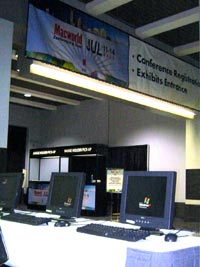 Caught this shot on Monday evening, before the conference really got into full swing. The computers here are owned by the Hynes Convention Center, and were set up to poll the attendees about their impressions.
My impression: guys, when you’re holding a Mac conference, take 30 seconds to change your screen savers, alright?
These was a rumor that Steve Jobs was in attendance and was wandering the show floor. This was accompanied by a story about a presenter who spotted him in the audience and got so flustered that he had to end his talk early. Honestly, I hope Steve’s got better things to do; if I can do the expo in 15 minutes, I can’t see what would make his visit worthwhile.
MacWorld Boston trip report
Best thing I can say about MacWorld: Boston’s a nice town to visit. I’m writing this in the shadow of an 1867 statue dedicated to “the relief of human suffering by the inhaling of ether”, so you know these guys know how to party.
MacWorld Boston is the red-headed stepchild compared to San Francisco (and increasingly the Worldwide Developer Conference), so most of the value of the conference came from meetings I had set up beforehand. Aside from that, the show floor was so sparse that I could walk it in 15 minutes, and I had finished everything I wanted to do on the floor by the end of day one. Day two I bought a few gizmos (an earclip flashlight, just because, and a BTI replacement battery for my laptop). Day three I didn’t even bother showing up, although I spent most of it in the Starbucks next door to the Hynes Center.
The good things I can say: all card-carrying geeks should make plans to see Andy Ihnatko speak sometime before they die. He’s a showman as well as a writer; what else can you say about a man who makes a robe out of discarded iPod banners for part of his presentation? His talk was fairly varied, but some high points included his two-cent heads up display (mirror reverse a PDF print preview, print to paper and place on car dashboard), and an amusing discussion of why the switch to Intel shouldn’t matter for most users.
I also enjoyed Ben Waldie’s talk on Automator; the crowd ranged from developers to complete newbies, and he seemed to make it interesting for all attendees. I’m looking forward to catching up with him at the Philadelphia AppleScript MUG at some point.
The real disappointment was the show floor. I really don’t have a strong enough need for high-volume DVD burners that I need to compare four vendors. There are really just so many iPod accessories that need to exist, but apparently some companies haven’t gotten that memo. And while I’m as crazy as the next person (here, anyway) about the newest bags I can use to shlep around my laptop, the biggest innovation I saw was the use of lavender ballistic nylon instead of Model T Black.
One group I will be keeping an eye on are the AppleSpecialists, a consortium of independent Apple resellers who are banding together to compete more effectively against the Apple stores. More than once I heard vendors expressing interest because it’s difficult at times to deal with the monolithic Apple corporate structure to get retail space. One of the members is MacUpgrades in my hometown, and I’ve been impressed enough with those guys for years to give high marks to the rest of the bunch.
Verdict: I’m glad I came, but the best parts of the trip were thanks to some of the people here. The show, not so much. Better to make plans for MWSF; I’ll be in Italy for the 2006 edition, but January, 2007 should be an eventful time to make my next appearance.
And it’s got a built-in handle
Via Slashdot, a review of the first Macintosh. What I find fascinating about this is what the author felt the need to explain:
Few things are as abstract as the data and programs stored and used on a computer. The Mac takes that abstraction and presents it as something familiar…. Do you want to put a document in a folder? Pick it up with the mouse and put it in the folder. Do you want to throw something away? Pick it up and put it in the wastebasket. Abstractions take on real forms that we can understand and use without obscure commands or bizarre syntax.
Another important aspect of this user interface is the way in which the Macintosh makes commands available to the user. As I write this review with MacWrite, the top of my screen has an Apple symbol and six words (File, Edit, Search, Format, Font, and Style) written across the top. If I point at any of the items with the mouse and press the button, a menu of options appears on the screen. When I release the button, the menu disappears. All available commands appear in the menus….
A special disk-copy utility is now available that lets you copy an entire disk in just four swaps – not too shabby when you realize that this utility uses nearly 80 percent of the total RAM just to hold the data.
Wow
Vatican web site, check. Apple’s web site, check. But still, I was floored to find myself written up on O’Reilly’s MacDevCenter. Thanks for the ink, guys, I’ll be smiling all day.
What the Intel switch really means
Well. This is why I don’t make my living as a fortune teller.
Yesterday, Steve Jobs shocked me and 15,000,000 of my closest friends by announcing that sometime in the next two years our shiny new Macs will be running on the brains of the enemy. Well, not enemy per se. But at least the Vichy CPU. It’s a bit hard to reconcile the anomie that on the one hand, Intel chips are wonderful for us starting in a year or two, but right now they still suck.
Naturally, this has caused the largest outbreak of heated debate on the Internet since the release of Hamsterdance. The net impact this should have on most users is zero; the CPU is safely protected beneath about a dozen layers of abstraction and unless you’re writing software, for most purposes you shouldn’t need to care about this one way or the other. When you board an airplane, do you ask yourself whether the engines are made by Pratt & Whitney? Or is your sole concern that you don’t take a sudden unscheduled stop in Kansas?
But that’s just a rational perspective, which doesn’t ensure that it’s going to be a part of the news discussion. The first AP article on the story—and unfortunately I have to paraphrase here as they’ve rewritten the text—opened with, “taking a risk that could threaten to reduce its already miniscule market share….” The current story leads, “After touting its Macintosh computers as superior alternatives for more than 20 years….”
Well, yes. And we still think the computers are superior, thank you very much. Show me a Wall Street analyst who has had to spend as much time troubleshooting one Windows server as it takes on a dozen Macs, and I’ll be glad to listen to him.
That’s the bottom line. Macs are Macs because of the OS. But perception is reality, and a bloviating pundit on CNBC who thinks he knows Macs because he used one in the Wharton undergraduate labs will get a larger audience than I do.
Still, there are some end-user issues here, no question about it. I know diddly about Intel servers (today), but I’m hearing that they run a lot hotter than PowerPC equivalents, and that’s a problem when you’re building a server closet. The Altivec in the G4 and the G5 can do some really stunning work without hitting the main CPU, and that’s one of the upcoming performance issues.
On the other hand, anyone who can write an emulator that can run the PowerPC version of Office and Photoshop—creme de la creme CPU hogs— on an Intel chip at decent speeds is practicing a form of black magic. That was demoed yesterday. Apple has another year to practice more necromancy, and I’m sure the result will be summarized: “Yeah, we’d like the emulation to be faster, but this is good enough.”
So what does this mean for Mac users? And for people not (yet) using Macs? I’ve spent the last 12 years working with around a hundred Mac-using offices, and I talk to folks in the other camp, and let me tell you—I think I live on a different planet from most Wall Street analysts on a normal day.
First, when the entire personal computing world is running Intel and Intel-compatible chips, the first thought is whether you’ll be able to buy a Mac and install Windows on it as well. Initial reports are that Apple won’t support you if you do, but they won’t try to stop you. So now you can buy that sexy Mac laptop (and here’s where we’ll find out if PowerBooks maintain their eye-catching qualities separate from the OS; my guess is “yes”), boot into Windows at work, and boot into Mac at home. Given the very large number of people I know who are currently dual-OS users on separate hardware, I think this will be a rather common occurence.
Which raises another interesting question. The Mac camp has believed for years that it didn’t matter how much better our OS was, or how much money was burned on protecting against Windows virus attacks; since the only glide path to adopting Mac OS was to switch hardware entirely, few companies were willing to take that level of risk. With Intel Macs, you might see a test group buying Mac hardware and dual-booting; if the Mac OS experiment fails, they simply leave those machines on Windows. If it succeeds, then watch that hardware spread further into the company as hardware is upgraded.
What happens if Mac OS is seen as better? Turns out, for 90% of business functions (which means, let’s face it, Microsoft Office and Outlook), there’s Mac software that does the same job or better. What forces many people to stick to Windows OS is that single application that doesn’t exist on Mac; granted, there are 100,000 such applications, but there are maybe a dozen prime suspects, and it’s very rare for a single user to run more than one or two.
Now let’s consider WINE, which allows Linux users running on Intel chips to launch Windows applications within a Linux environment. Tack something similar into the new Mac OS, and suddenly you don’t have to leave the Mac environment to pop into Act! or your CAD software.
I’ve read one analysis that predicts that this will lead to the death of the Mac. But this could work the other way: perhaps a side-by-side comparison of Mac versus Windows will lead people to stick with the Mac overall environment, and they’ll launch those remaining apps only with great reluctance. Which is much the experience of Mac users today running Virtual PC or a separate Windows PC.
At the risk of condescending to my Windows-using friends, most Mac users believe that Windows users put up with their software because they don’t know any better. During a recent side-by-side web development session, it made my eyes hurt to see how my website is rendered with Windows. If we’ve been right all along, then more people are going to see how the other half (alright, 16 percent) lives.
So far, though, I’ve still just been dealing with Macintosh hardware. The big wildcard is Mac OS on existing Windows hardware. Apple’s official line as of yesterday is, “no, you can’t do that.” Talk about waving a red flag in front of the world’s hacker community, which loves doing what they can’t do. Apple also said, “you can’t install Linux on an iPod,” and look what happened.
Well, actually, Apple never said that, because they probably never thought that anyone would be crazy enough to try. OS X on Windows hardware, heck, that’s a no-brainer.
So given my previous history of thinking that what happened yesterday would never happen, I’ll try to redeem myself with this one: Mac OS X will be running on Windows hardware within weeks of its release. The only question is whether it will require major geek skills to get it running (cf. WINE under Linux), or whether it’s point-and-click (cf. X11 on Mac OS X).
Let’s move ahead a few months. Windows users are clamoring to buy OS X for their hardware. Apple has already started to see if the dual-boot scenario I posited above lets them sell hardware to previously-closed enterprises—and hence allows them to take a smaller hit on hardware sales by not forcing people to buy Mac hardware to run Mac OS. Anyone who wants to can do this anyway if they’re willing to jump through a few hoops (or, ahem, hire a consultant to do it for them). What it takes is for Apple to believe that their hardware can sell itself on its own merits.
What do you suppose Apple’s response will be? Well, you used to need a Mac to buy an iPod.
Then you finally have the true deathmatch—Mac OS on Windows machines, Windows running native on Macintoshes. Microsoft releases Longhorn, Apple releases Leopard (Mac OS X 10.5), and you can try them both out. But most of the world is still running Windows. What does Apple do then?
Tiger will then be the old OS. It will run on Intel machines. So Apple runs the Switcher campaign of all time and you’ll be able to buy it at any Apple retailer for $19.95. Which means that you’ll have to walk into an Apple Store and take the initial sip of the Kool-Aid: look over the new Apple hardware that blows away the features of your current hardware, talk to a few Apple Geniuses, and pick up the materials from what is indisputably one of the best marketing machines on the planet.
Yes, even I think this all sounds crazy. But after yesterday, it’s the path of least resistance.
Coming next: what current Mac owners should do, what prospective Mac owners need to know, and what this means for any professional working on the Mac platform.
[This essay is part of The Red and the Blue discussion: Apple Switches to Intel.]
Quote of the day
I felt something, a disturbance in the network, as if a million mac zealots cried out in horror and were suddenly silenced.
—One Slashdot reader comments on Apple’s switch to Intel
iTunes, iMovie, iBuy
Apple to launch a pay music service that integrates with iTunes. Ease-of-use becomes ease-of-wallet-emptying.