In the previous installment of this post, I discussed a number of raging errors in Microsoft’s demo of the future, possible only if the designers hold a deep contempt for both their audience and the details included in their HD broadcast. If we take the video at face value, nearly everyone depicted is living a largely joyless, obsessive-compulsive existence. To not take this video at face value, one wonders what kind of management by committee would be necessary to make these kinds of howling mistakes.
For example, a phone call originates at 7:30 AM on April 12th in Johannesburg, and is received on February 19th in Hong Kong. So not only will our future Microsoft Zune iPads have holographic technology, they’ll also be remanufactured out of discarded TARDISes.
In any case, we’re now back to more insane user interfaces, and having already written a few thousand words, I’m caught up to a whole forty seconds into the video.
The Devices, Continued
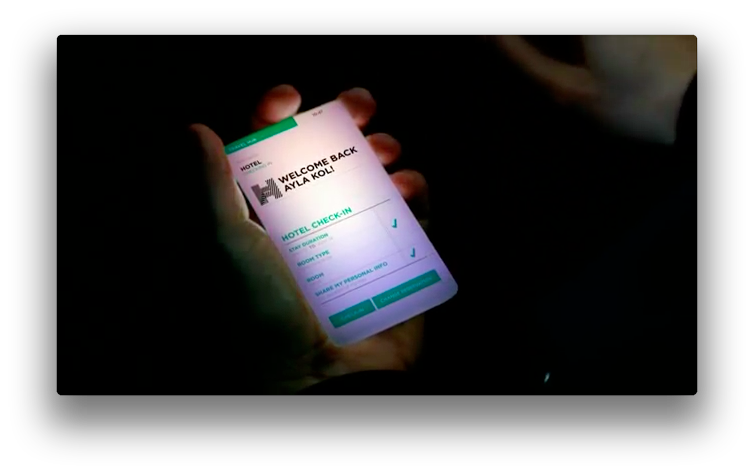 |
Without referring to the video, what do you suppose the above picture indicates? The text states “Stay Duration”, no check; “Room Type”, check; “Room”, no check; “Share My Personal Info”, check. The Share Info check is blank at first but then appears, presumably in response to a voice command. This immediately precedes Impeccably Tailored Bellhop Assistant looking at his impossible business card display.
The problem here is that it’s mixing multiple modes with the same UI. Presumably, the first three items are Ayla’s room preferences. The checks must mean hotel confirmation that she’s received her preference prior to checkin. Or it’s some kind of bizarre personal checklist to confirm that the hotel has kissed her ass appropriately. Or, most likely, it means absolutely nothing at all, because it’s hard to understand how she has her room type confirmed without a room number.
Meanwhile, the last entry is a user control that she can toggle, and it appears with an identical interface in a list of items of a completely different type. This is meant to show us how useful and intuitive Microsoft interfaces will be in 2021.
(You may interrupt at this point to say that I’m being too nitpicky. I’ll remind you that this kind of demonstration is the whole fricking point of the video.)
Cut to our buddy Qin, who had to sacrifice his Sunday afternoon, but at least he didn’t have to stay up all night like that poor bastard Jeff Zheng. Or is that Zeng? Qin’s phone can’t quite decide which it is.
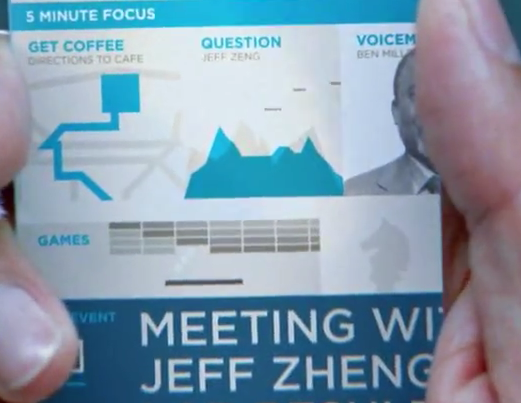 |
We arrive at this screen as follows: first we see the home screen for this Hong Kong resident standing in a Hong Kong subway station. The top headline of the day: the Senate has passed a new environmental regulation. Either Bing News is having a bad day, or the Chinese government will go through some changes in the next 10 years.
Qin taps on a picture captioned “Social,” which scrolls him to a lower page (not the second page, as the home page is shown to extend in all directions) instead of doing anything social or resembling a button press. Here we find that he has a portal called “five minute focus,” presumably with the things he needs to do in the next five minutes. Again, Microsoft believes this should be on a subpage, not in the primary display.
In the next five minutes, Qin is instructed how to get coffee, presented with an email message with attachments and an IM history, and has an incoming voicemail. Meanwhile, it’s 10:34 AM and his meeting is at 11 AM, so let’s hope that the subway is quick. Of course, nothing about this futuristic interface says anything about travel time or subway arrivals. I guess in the future, everyone in Hong Kong is Jewish and no one cares if you’re late.
The email from Jeff Z(h)eng pops up onscreen without a user request; unlike similar interactions in Ayla’s cab, it’s hard to believe that this is supposed to be a voice command because a) he’s on a crowded subway platform, and b) there’s a goddamn benefit concert going on over his left shoulder. So Microsoft devices apparently decide for you which email you need to read right now. And tell you about someone’s birthday—again in a pop-up with no user input.
This is still labeled “five-minute focus.” Considering how many fucking things we’re expected to get done in five minutes in Microsoft’s future, it really sucks that we’re working 160 hours a week.
Fortunately, Qin is also waiting on some lab results, so with any luck he’s picked up a drug-resistant Asian flu and will get to be bedridden for a long while.
We then get what could be the most bugfuck insane prediction of the video. A voicemail message is transcribed, “Can you approve the order?” A message appears saying “Creating reply interface…,” and Microsoft Bugfuck for Windows Phone with No Windows displays a numeric scroller which Qin uses to change “35” to “40.”
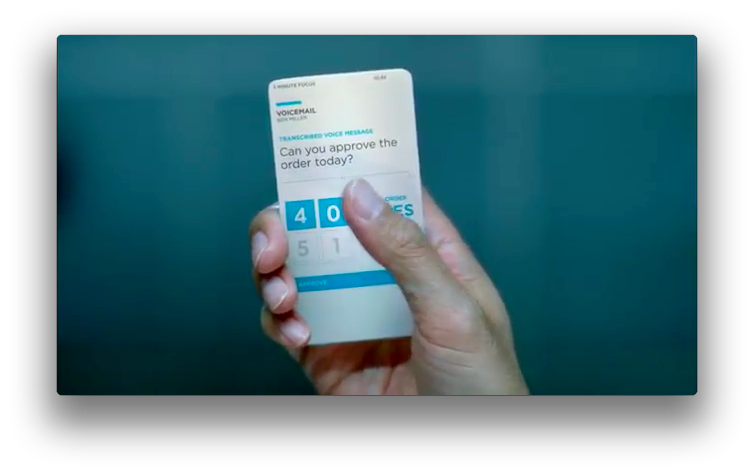 |
That’s the only interface for a transcribed voice message. Qin can hit an “Approve” or “Place Order” button. He can’t, for example, reply to the message. Or call Ben back. Or take a look at some document indicating whether he’s purchasing 40 liters of potassium nitrate or plutonium. Or cancel the order. About the only thing this advanced user interface allows him to do is to order 80 or 90 liters by mistake when some commuter jostles his arm.
The Environment
Microsoft depicts a future where pretty much any flat object is a display and control surface, and they all instantaneously integrate with the gadgets you’re carrying. In Ayla’s taxi, the window provides a heads-up display showing remarkably worthless information about her trip; in her hotel room, a wallscreen and a tablet apparently included with the hotel room immediately context-switches to whatever she’s doing.
 |
Here she’s picked up the tablet while her back is to the wall; the wall switches from a “good morning Johannesburg” hotel info display to provide her instead with something relating to the work that’s on the tablet.
Of course, the first question is why she needs the tablet at all. The entire fricking table it’s on has the same controls, and presumably they’re all brimming with holograms. The purpose of the tablet appears to be so she can sit on the edge of the bed and use a touch interface, instead of the holograms in the much better wall display, or the much larger table by the window. This places her focus in her lap, which means that anything supplementary that appears on the wall (and presumably her iPod touch) is either intended as a distraction, or is important information that isn’t in her peripheral vision.
Later, a phone call arrives from her daughter, miraculously during the 18.8 seconds of downtime she has available this morning. Ayla, of course, takes the time to pick out a recipe for her, while the wallscreen merrily follows along with supplementary information. At this point, I was expecting her to pull a piece of pie out of the hologram so she could see how the recipes tasted.
Back home in Sydney, a large whiteboard receives the messages Ayla sent to her daughter, as opposed to having them go to Sydney’s dedicated tablet. (The daughter and the city are both named Sydney. Or her name is Shannon. It changes. No, really.) Unnamed Ayla husband is reminded by the AI in his car to schedule a tune-up, which he drags with a smile to his busy schedule. Offscreen, an unnamed mechanic receives a message telling him to reconfigure his entire schedule for His Eminence, because there’s no indication that this scheduling had anything to do with the mechanic’s workload.
Credit where credit is due: the idea that all sorts of display surfaces will configure themselves to your liking is a premise that’s both possible and useful. I’m less sanguine about whether a hotel in 2021 would provide a flatscreen and tablet computer that automatically hosts these services instead of, say, advertising $99 for one day’s Internet connection and a reminder of all of the movies I haven’t seen on pay-per-view. Indeed, the dystopian insanity of having my entire world reconfigured to show me advertisements is the main reason why I think I’d prefer to drop dead before existing in Microsoft’s world.
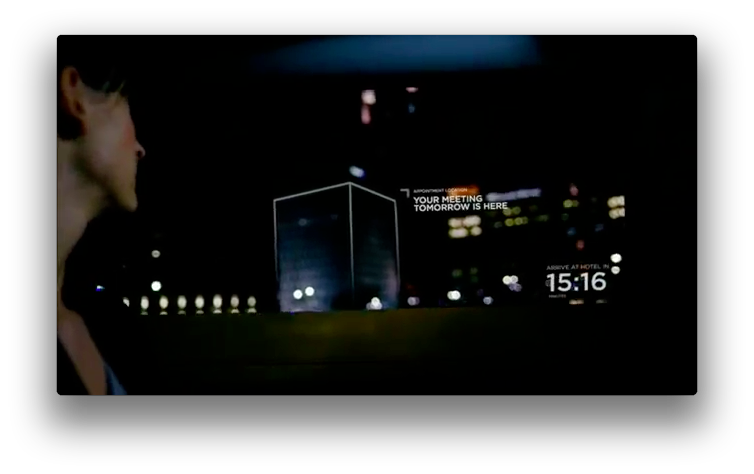
For example, here is the clean, uncluttered view out of a cab window in 2021, according to Microsoft:
|
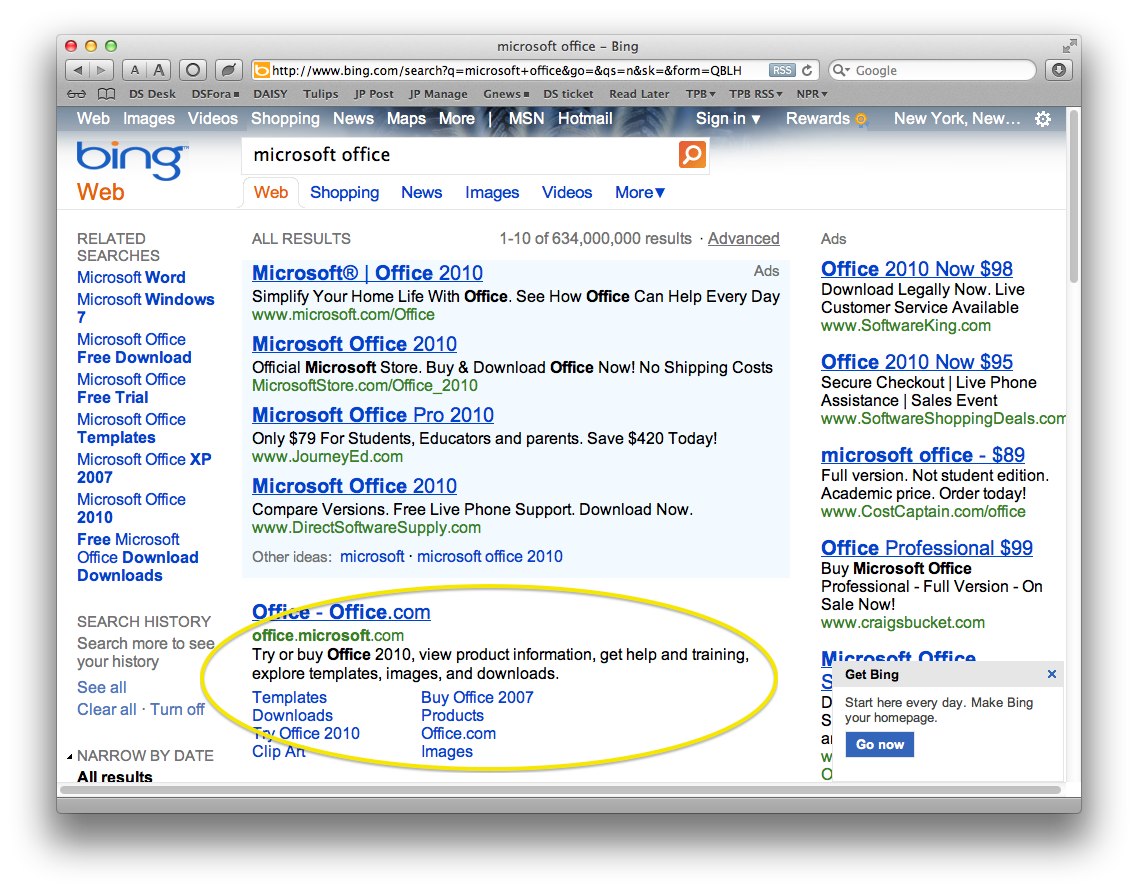
And here is the clean, uncluttered view of a Bing search in 2011, according to Microsoft. The highlight indicates the search result.
|
In other words: in the future, the killer app will be a Flash blocker for real life.
Coming next: how a competent designer or futurist would have presented a completely different view of technologies that are not bugfuck insane.
Pingback: Microsoft’s Dystopian Hellscape, part 1 | The Vast Jeff Wing Conspiracy
Pingback: Modest Proposals for Microsoft’s Future | The Vast Jeff Wing Conspiracy